HawkSoft enables your agency to track open balances due to the carriers by generating an Unpaid Payables Report when your agency creates agency bill invoices. You can export the transactions to QuickBooks, and optionally queue up checks to print.
You can process Company Payables on a Paid Per-Item basis (if you pay carriers one check per individual invoice item) or a Per-Statement basis (one carrier check made for multiple items).
When you process Company Payables, you are also creating retained commission entries in your trust account. For steps on transferring commission earnings from your trust account to your operating accounts, see Transferring Funds in QuickBooks (Agency Revenue).
Paying Company Payables is typically performed by the agency Bookkeeper, or the person at the agency responsible for processing the Company Payables statement.
 Paying Company Payables Per Statement workflow
Printable PDF
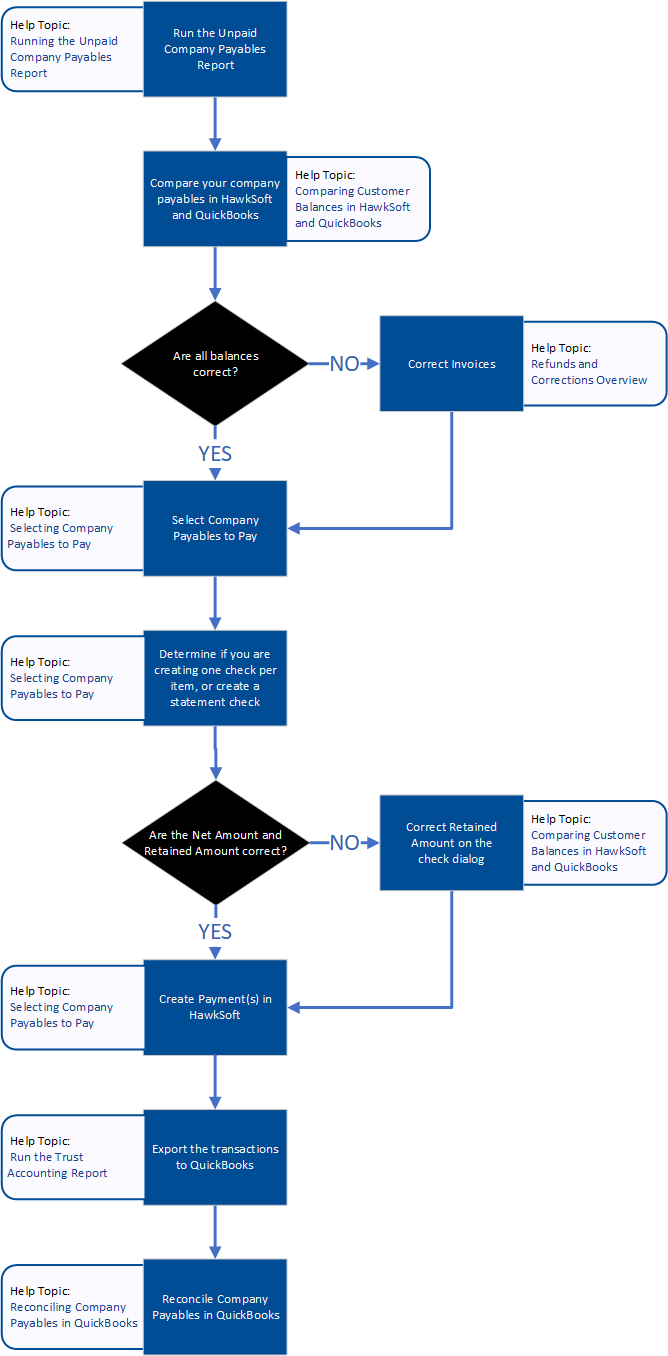
Running the Unpaid Company Payables Report
The Unpaid Company Payables report contains all invoices that have not been paid to the carrier. This report is run as part of paying your company payables.
Comparing Company Payables in HawkSoft and QuickBooks
HawkSoft enables you to generate an Unpaid Company Payables Report for the purpose of comparing company payables in HawkSoft and QuickBooks®.
This report helps identify any duplicates, missing items, or conflicting information between HawkSoft and QuickBooks. You can also use it to verify that all transactions for the month have been exported correctly.
Selecting Company Payables to Pay
Company payables can be processed on a Paid Per Item basis (if you pay carriers one check/payment per invoice) or as a bulk check if you pay on Per Statement basis (one carrier check/payment made for multiple invoice items).
Selecting Company Payables to Pay
You can create a commission statement for retained commissions as part of paying company payables. This enables you to create commission statements on agency bill policies.
Reconciling Company Payables in QuickBooks
Reconciling Company Payable accounts is a key step to ensuring the accuracy of your accounting records. Reconciling confirms that your customer has been invoiced for the gross amount that was invoiced by the carrier, and that any retained commission has been recorded correctly.