HawkSoft supports your agency's Sales Pipeline to help you track and report on your prospects to make sure your new policies move through the process from discovery to sold. It is important to configure HawkSoft to use the Sales Pipeline correctly, for accurate reporting.
See About The Sales Pipeline for more information.
This task is typically performed by an Owner/Administrator, Manager, or Bookkeeper.
 Required Permissions:
In order to complete this task, user permissions must be set to include:
Agency Setup > Customize Lists
See User Permissions for more information.
Set your defaults for new prospects
To encourage your agency to utilize the Sales Pipeline, configure your agency's General Settings to always default new policies to Prospect.
-
Click the
 Setup icon, and then select General Configuration.
The General Configuration dialog opens, with the General Settings side-tab preselected.
-
Select Default Status & Company to Prospect on New Policy.

- Click OK.
When this setting is selected, new policies will automatically have the Policy Status and Company set to Prospect.
For commercial policies, make sure you have set up all of your lines of business under the Prospect Company in Policy Company Setup.
Customize the Sales Pipeline Sub-Statuses
The Sales Pipeline policy statuses are available when users insert a prospect policy and are intended to help track prospective business through the sales process. Users can further define the Sales Pipeline by selecting a sub-status.
HawkSoft has default sub-statuses associated with each Sales Pipeline status.
HawkSoft's default Sales Pipeline statuses:
| Status | Default Sub-Status | Description |
|---|---|---|
| Lead |
Indicates possible interest. Example: An existing client mentions they might be purchasing a vacation home. You can enter a new Home policy with a Status of Lead and follow up with the client at a later date. |
|
| Unqualified |
Client insurance needs are unknown. Example: A list of leads in a residential zip code. |
|
| Qualified |
Client insurance needs are known. Example: A mortgage broker has sent a list of recent mortgage applicants. |
|
| Prospect |
The client is interested in receiving a quote. The policy has not been sold. If your agency has configured default tasks to trigger when the status of a policy is changed to Prospect or New, then a task is automatically created and attached to the log note. |
|
| Discovery | The agency is gathering information needed for underwriting and quoting. | |
| Submission |
The agency has submitted the application to its carriers for approval and/or quote. Use Submission Tracking in HawkSoft to track the status and details of the application. SeeTrack Submissions for more information. |
|
| Quote | A quote/offer has been extended to the client. | |
| Proposal | The agency has issued a formal insurance proposal to the client. | |
| Refused | The client declined the quote/proposal. | |
| Price | The client declined due to price. | |
| Didn't Buy Risk | The client did not proceed with purchasing the item to be insured. | |
| Rejected | The policy has been disqualified. | |
| U/W Rejected | The Underwriter rejected the client's application. | |
| Agency Disqualified | The policy doesn't meet the agency's standards. |
To add and remove Sales Pipeline sub-statuses to the Action menu
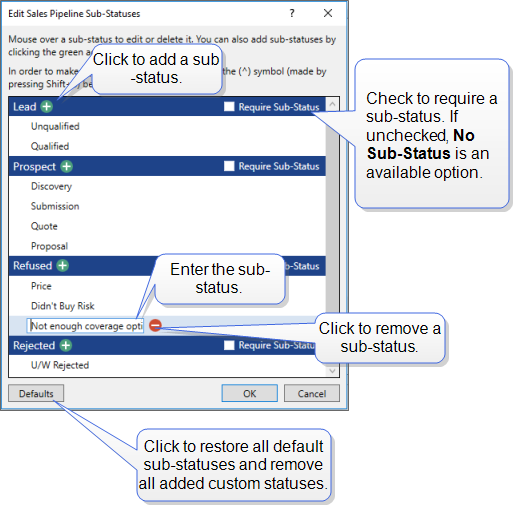
You can modify or remove the default sub-statuses and add custom sub-statuses to meet your agency's needs.
Required Permissions:
In order to complete this task, user permissions must be set to include:
Agency Setup > Customize Lists
See User Permissions for more information.
- Click the Settings icon, and then select Customize Lists.
- Select Sales Pipeline Sub-Statuses and then click Edit.
-
Modify the list as needed.
-
Click OK to save.
You will see your saved sub-statuses next time you use the Action menu Sales Pipeline.
Related Topics