HawkSoft automatically tracks changes made to a policy over time through Policy Histories to keep a historical record of policy information.
Policy Histories are accessed from the History tab on the policy. You can open an individual Policy History to see policy details at the time the change was made.
This article explains how HawkSoft generates Policy Histories and how to view them from a client/policy.
Policy History is not to be confused with Policy Snapshots, which were called Policy Histories prior to version 4.9.
A Policy History is a summary of manual changes made to specific basic policy information fields (i.e. Policy Status) and is automatically created when the change is made. Policy Histories are stored on the History tab of the policy. This allows users to quickly view the information changed on the policy and when the change was made.
A Policy Snapshot is a document containing a detailed summary of policy information changes that can be created by a download or by a user when manual changes are made to the policy. Policy Snapshots provide a record of policy data changes such as carrier name, Insured's contact information, premium, policy dates, vehicle information, and coverages at the time a change is made to the client or policy and is associated with a log note and/or saved to the Attachments tab. When a carrier does not send downloads, using the Policy Snapshot feature is a good way to track and compare manual changes made to a policy over time. For more information, see Policy Snapshots to learn how to enable this feature.
 Required Permissions
To perform this task, no specific user permissions are required.
To generate a Policy History
HawkSoft generates Policy Histories automatically when a change is made to specific fields on a client and/or policy.
Changes made to any of the following fields automatically generate a Policy History:
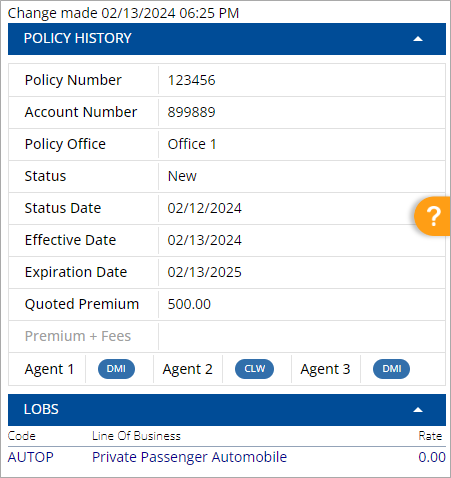
See Making Changes to a Policy or Making Changes to a Client for instructions on making a change to these fields.
To view a Policy History
Policy Histories can be accessed from the History tab of a policy.
-
Retrieve a client, and then select a policy tab.
-
Select the History tab.
-
Click the
 Load History Now button.
A list of all Policy Histories for this policy displays, and is organized by customizable columns of relevant fields.

-
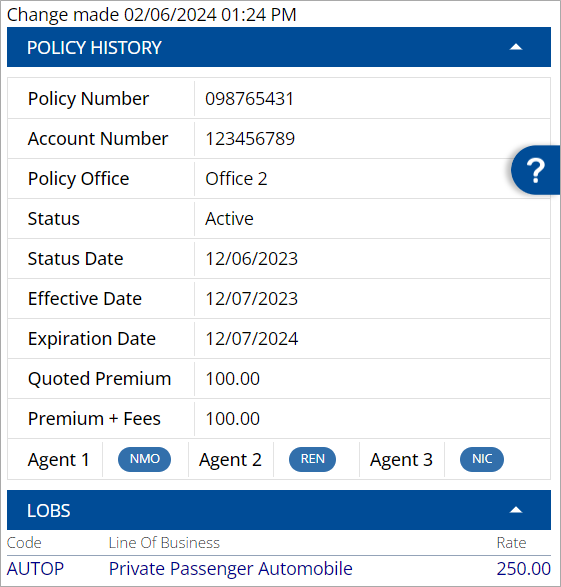
Click a Policy History to view more details about the policy history on the right-side panel of the screen.
A dialog opens and displays relevant field information at the time the history was created.
You can click the LOB Code, LOB, or Rate fields to instantly copy to your clipboard.
Related Topics