Sharing a Log Note
You may occasionally need to share a log note with another agency user. HawkSoft offers a share option that copies a hyperlink directly to your clipboard. This article explains how to export a log note and how to access that log note once it is shared.
Users must be able to access your database and have appropriate permissions to the client file to access the log note. See Exporting Log Notes to learn how to share a log note outside your agency.
 Required Permissions
To perform this task, no specific user permissions are required.
To share a Log Note
-
Open the Log Note you want to share.
-
Click the
 share button in the upper right corner of the log note dialog.
A green message appears at the bottom of your screen confirming "'Log on CLIENT (CLIENT ID)' copied to clipboard". -
Paste the log hyperlink into an email or chat.
To Access a Shared Log Note
-
Right click on the hyperlink and select Open Link.
You can also copy and paste the link into a browser and hit enter then proceed to step 3. -
A browser tab opens.
-
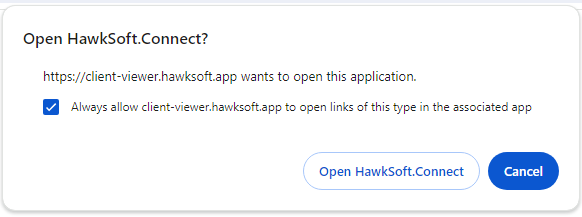
Click Open HawkSoft Connect.
Optional: Check the box to "always allow client-viewer.hawksoft.app to open links of this type in the associate app" to skip this step in the future.
-
HawkSoft launches if it is not already open.
The client launches and the log note displays.
Related Topics