HawkSoft enables you to add additional sub-statuses to the Cancellation statuses available from the Action menu.
The Cancellation statuses are intended to track policies that have been canceled. The sub-statuses associated with each Cancellation status are used to further define the reasons for the cancellation.
See About Policy Statuses: The life of a Policy for more information about the Cancellation statuses and default sub-statuses.
This article explains how to add Cancellation sub-statuses to the Action menu.
 Required Permissions
Required Permissions:
In order to complete this task, user permissions must be set to include:
Agency Setup > Add to Action Menus
See User Permissions for more information.
- Click
 Setup, and then select Customize Lists.
 - Select Cancellation Sub-Statuses, and then click Edit.
-
Modify the list as needed.
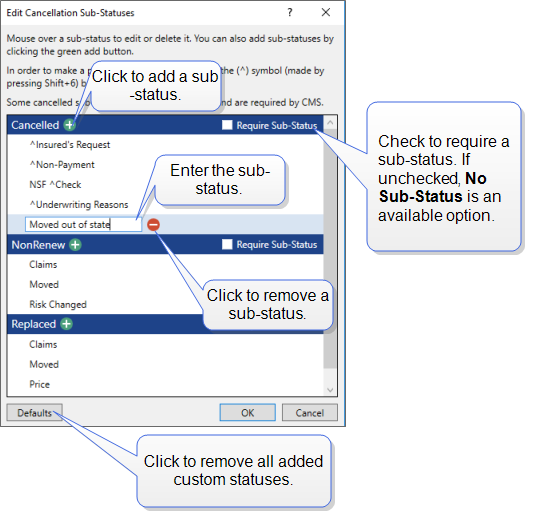
-
Click OK to save.
You will see your saved sub-statuses next time you use the Action menu to cancel a policy.