User Permissions
HawkSoft enables agency administrators to determine which types of client files and which areas of the HawkSoft database a user can access, as well as which actions a user can perform in HawkSoft.
This article provides an explanation of each of the user permissions and what each permission allows your users to do in HawkSoft.
Editing User Permissions
-
Click the
 Setup icon, and then select User Setup.
OR
-
Log into the HawkSoft Web app, accessed from any computer.
-
Click the
 Setup menu at the top-right corner, and then select User Setup.
 For more information about logging into the HawkSoft web app, see Logging In and Out of HawkSoft.
The Agency Setup window opens to the User List tab.
-
-
Select a user from the User List.
You can enter a user's name or user initials in the Search Agents and Offices field to quickly find a user in the list.
- Select the Permissions tab.
- Click Open Permissions Editor.
-
Check or uncheck permissions based on the user's job responsibilities and agency tasks.
See the User Permissions below for a description of each permission.
-
Click Close when you are finished updating permissions.
-
Click Save.
 User Permission descriptions
| Permission Groups | Description |
|---|---|
Client Access |
Users must have permission for both Client Type and Customer Type to access each client. For example, you can give a user permission to Client Type: Customer, and then limit the Customer Type to Commercial. Client Types– Client Type is set on the Name and Address screen for each client.
Customer Types– Customer Type is set on the Name and Address screen for each client. Users can access clients with multiple Customer Types, as long as they have access to at least one Customer Type selected on the customer.
|
Agency Setup |
General Configuration– User is able to modify General Configuration settings for the agency, which include General Settings (agency logo, ID-Card days, policy snapshots), HawkSoft Toolbar Customization, Required Fields for clients and policies, Print Settings, and the default Phone Dial-Out Integration. The user can also set the PDF Security, Contact Information Alerts, and mask Personally Identifiable Information from Additional Settings in General Configuration. Agency/Office Setup– User is able to configure agency and license information, office setup, and default agents for your agency and for each office. User Setup– User is able to manage agency users (add new users and update user information, including applying templates, determining user permissions, and assigning users to offices). User is also able to view and releaseActive Client Locks. Users are not able to change their own permissions. Carrier Setup– User is able to configure carriers (lines of business and coverages) for your agency. User will need additional permissions to configurecarrier clients. Correspondence Templates– User is able to create and manage correspondence templates such as form letters, email, proposals, and base templates. Additional/Other Interest/Certificate Holder Database– User is able to access a centralized database of common Loss Payees, Mortgagees, Additional Interests, and Certificate Holders that enables users to easily select a database item when inserting or editing policies. Client Custom Fields– User is able to create and manage client information fields that are not included in any of the standard fields found in the Edit Client/Policy dialog. Direct Integration– User is able to configure integration with the NY DMV to print NY ID Cards. Texting Administration– User is able to view all unprocessed texts for the agency. Bridges– User is able to configure Rater Integrations. Add to Action Menus– User is able to customize the Action Menu From/To options, Activity Tags, Cancellation Sub-Statuses, Client Tag Categories,Commercial Hazard Classifications, and Workers' and Comp Classification Codes. Log Templates– User is able to create and manage Log Templates for your agency that include consistent log details and a description. Types of Claims– User is able to create and manage Types of Claims for the agency that can serve as a way to track claim types in your agency when you runClaims Reports. Sources– User Is able to create and manage Source items to track marketing strategies when you insert new clients and/or new policies. Attachment Descriptions/Categories– User is able to create and manageattachment descriptions and categories to help filter new and existing attachments in your agency. |
Client Actions |
Insert Client– User is able to insert a new client for the agency (based on the types of clients they have been assigned permissions for inClient Access). Edit Client– User is able to update an existing client or policy using theChange Client/Policy and Change Policy Status menu items. User is also able to submit and update Claims. Change Client Type, Status– User is able to edit the Client Type, Customer Type, and Client Status fields from the Name and Address screen when editing a client/policy. Change Client Office– User is able to edit the Office the client belongs to from the Name and Address screen when editing a client/policy. (Multi-office agencies) Change Client Producer/CSR– User is able to edit the Producer and CSR responsible for a client from the Name and Address screen when editing a client/policy. Change Agent 1– User is able to edit the first agent responsible for a policy from the Policy Information screen when editing a client/policy. Change Agent 2– User is able to edit the second agent responsible for a policy from the Policy Information screen when editing a client/policy. Change Agent 3– User is able to edit the third agent responsible for a policy from the Policy Information screen when editing a client/policy. Change Policy Office– User is able to edit the Office the policy belongs to from the Policy Information screen when editing a policy. (Multi-office agencies)
Change Inception Date– User is able to change the Inception Date (the date the policy was initially written) when editing a policy. An Inception Date can be entered for a new policy regardless of Permission. Change Agent Code– User is able to edit the agent code associated with a policy on the Policy Information screen when editing a policy. Allow Sending Text Messages– User is able to send outgoing text messages using the HawkSoft Text Messaging feature. Allow Editing/Removing of Exclusive Tags– Allows user to edit or remove aClient Tag that has been created with an Exclusive Tag Create/Edit Submissions– Allows user to create, edit, or archive Submission tracking items (Submissions and Submission Groups) on a client/policy. Action Menu– User is able to launch the Action Menu to perform client and policy related tasks, and use Toolbar shortcuts. Disabling this permission will also disable all child permissions related to Action Menu. Duplicate Policies– User is able to Duplicate/Remarket Policies. Action Menu > Internal– Enables user to use the Internal options on theAction Menu. Archive/Move Policies– User is able to Archive Policies, Move Policies to another client, and Merge Clients. Archive Client– User is able to Archive Clients. Mass Data Importer– Allows the user to use the Data Importer to import data into your client/policy database from a spreadsheet or database file. |
Reports |
Access Agency Intelligence– Gives user access to several predefined Agency Intelligence reports which include Key Performance Indicators (KPIs) such as Customer Retention and Policies Sold within the past 12 months. Access Sales & Retention– Gives user access to several predefined Sales and Retention reports which include lead management and renewal data. Run Quick Reports– User is able to run/create/save quick reports on clients, policies, profiles, claims, and client tags. Run Activity Reports– User is able to run/create/save new reports on all client actions by date range, or by all activity tags by date range. Allow Exporting of Report Data– User is able to export or copy report data in CSV format. Allow running reports with unmasked PII- User is able to run a report and include unmasked PII including SSN# and DL#. Unmasked columns remain unmasked when you save, share, or export a report. |
Document Mgmt |
Edit Attachment/Forms Properties– User is able to modify the Properties of a Form/Attachment using the right click menu. Archive Attachments– User is able to archive client attachments. |
Batch Actions |
Batch Email– User can configure their batch email integration and sendbatch emails from a report. Data Replace– User is able to make batch changes to clients and policies from a report. |
Tasks |
View Agency Tasks List– User is able to view Agency Tasks and modify tasks for the agency. The tasks associated to a client will be visible despite Client Access permissions, but action on the tasks will require Client Access permissions. Allow Tasks Management– User can close 'locked' tasks for their office (or for the whole agency if Multi-Office Mode is enabled), reassign tasks in batch, and permanently remove Tasks for themselves and other users. Allow Multiple Tasks to be closed at once- User can close multiple tasks assigned to them and append any associated log notes at once from My Tasks . Access Tasks Configuration– Users can create and manage task templates and categories for the agency. Allow user to select "Must be assignee to edit"– User is able to 'lock' tasks to restrict editing of a task during the creation of a task. |
Accounting |
Access Trust Accounting Settings– User can access Trust Accounting Settings to configure your agency's time zone (for accounting purposes), receipt options, and invoice options. Enable Client Trust Accounting– This is a parent permission for all trust accounting transactions on a client, including invoicing, credit memos, and payments. Allow Invoice/Credit Memo Creation– User can create Invoices andCredit Memos on a client for premiums, taxes, and other fees, or to apply a credit to an open invoice. Allow Edit of Invoice Date/Time during creation– User can edit the Date/Time while creating an Invoice or Credit Memo on a client. Allow Apply/Unapply of Credit to Invoices– User can adjust which credits apply to which invoices on a client. Allow Payment Creation– User can process Payments on a client. Allow Edit of Payment Date/Time during Creation– User can edit the Date and Time while creating a Payment on a client. Allow Voiding of Accounting Items on Clients– User can void Accounting Items (Invoice/Credit Memo/Payment) on a client. |
Accounting Reporting |
Allow QuickBooks Integration workflows– User is able to mark items to be exported to QuickBooks, and able to reverse items from QuickBooks for any items they can see (set by Item Access permissions). Access Trust Accounting Report– User is able to access Trust Accounting reports of all Trust Accounting transactions for an individual date or a specific date range, unpaid company payables, and customer accounts. To open the Trust Accounting Report, user requires two additional permissions:
Access Transactions back two days- User can see transactions back two days including current date in Trust Accounting Reports. Access Transactions with any date– User can see transactions from all dates in Trust Accounting Reports. Access Transactions created by user only– User can only see transactions created by themselves in Trust Accounting Reports. Access Transactions from all users– [Default selection] User can see transactions created by any user in Trust Accounting Reports. Allow Voiding of Accounting Items on Reports– User can void Accounting Items (Invoice/Credit Memo/Payment) in, unless that item has been linked to an Accounts Payables transaction for multiple invoices/credit memos. Access Customer Accounting Reports– User can run Customer Accounting Reports for customer balance summary, unapplied credits and payments, and unpaid invoices. Access Company/Agency Payable Reports and Workflows– User can run the Company Payable/Agency Revenue reports and create Checks. |
Commissions |
Access Commission Settings- User is able to access and modify Commission Settings and configure agent rules for users in your agency. Allow Viewing Commission Transactions on Client- User is able to view details of Commission Transactions on a client. Allow Commission Processing & Reporting- User is able to create, modify, void/delete, reconcile, and report on Commission Transactions, and import, create, or archive statements. Allow Creating/Editing Commission Transactions- User is able to view, create, and edit commission transactions from a client/policy only. Users who have the Allow Creating/Editing Commission Transactions permission can create and edit commission transactions on clients. |
Downloads |
Downloads Dashboard– User is able to access the Downloads Dashboard.
Configure Local Downloads– User is able to Configure the location path where downloads are saved for your agency. Delete Clients from Batch- This permission is no longer applicable. |
Agent Portal |
Allow Agent Portal Access- User is able to access HawkSoft Agent Portal from any of their devices with internet access. IP Access Management rules may disallow access to Agent Portal even if the user has this permission. |
User Permissions by Office
HawkSoft enables Multi-Office agencies to grant (or revoke) access to specific areas of each agency office's client data, reports, and accounting, as well as choose which specific functions a user is allowed to perform in specific offices.
For example, you can grant a user access to view and edit clients in one office, and only view (but not edit) clients in another office.
Additionally, you can hide unauthorized client files. If this option is enabled, your users will not be able to see any information about clients or policies in search results unless they have Client Access permissions to that office. If this option is disabled your users will see those clients in search results, but will need permissions to access and edit clients.
Is User Permissions by Office right for my agency?
User Permissions by Office is useful when your agency has outside producers, multiple business entities, or when you want more control over which clients each of your employees has access to.
Because User Permissions by Office makes user management more complicated, HawkSoft recommends keeping User Permissions by Office disabled, unless your agency needs to limit user access to files and limit actions that can be taken.
There are many reasons to consider enabling User Permissions by Office. Here are some examples:
-
You have outside producers and want these producers to ONLY see those clients that are in their respective “office”.
HawkSoft recommends enabling User Permissions by Office and Hide Unauthorized Clients.
-
You have multiple business entities and DON'T want each office to see each others' clients.
HawkSoft recommends enabling User Permissions by Office and Hide Unauthorized Clients.
-
You want to restrict access to your Life/Health clients so that only licensed employees can see data protected by HIPAA.
HawkSoft recommends enabling User Permissions by Office, and disabling Hide Unauthorized Clients.
To enable User Permissions by Office
User Permissions by Office is disabled by default. If your agency needs the ability to grant users different permissions depending on which office's data they are accessing, have your Agency Principal contact Product Support to request enabling User Permissions by Office for the agency.
Product Support can also enable the hide unauthorized client files setting for your agency if needed.
Prior to enabling User Permissions by Office
-
Verify that all of your customers have been assigned to an office by running the All Clients Quick Report.
You can run a Data Replace to batch reassign the Client Office for clients who have not been assigned to an office.
Your users will NOT be able to access any clients who have not been assigned to an office.
-
Verify that all users have been assigned to the correct office(s) by reviewing your User List.
After enabling User Permissions by Office
-
Assign the correct office permissions to each of your Users Templates.
-
Assign the correct office permissions to each of your users in the User List.
You can use user templates to update permissions, but not offices, of existing users.
To set Office Permissions for a user
Determine which offices the user needs access to on the Offices tab. Once you determine the offices, you can set specific permissions for each user, per office, for relevant office permissions.
When User Permissions by Office is enabled, you will see the Offices button next to each permission that can be office specific.
Some permissions are applicable at the agency level and cannot be limited to specific offices. These Agency permissions will not show an Offices button next to the main permission toggle.
An additional column for each office the user has access to is available so you can easily set specific permissions. If the user has a  green check, they have permission for that feature for that office. If the user has a red x, then they do not have that permission at that office.
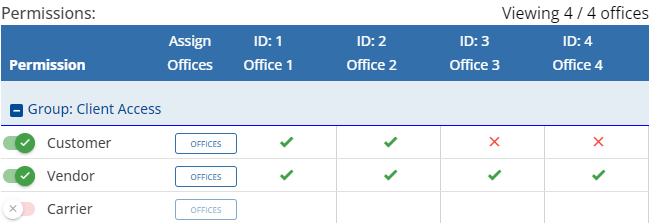
In this example, the user has access to clients with a Client Type of Customer in 2 out of 4 offices, Client Type of Vendor in all offices, and can't access Client Type of Carrier.
Before setting Office Permissions for a user, make sure the user has access to the correct offices, and that the user's basic Permissions have been completed. SeeOffices (Multi-office agencies)for information about assigning a user to specific offices. See User Permissions for steps on setting a user's basic User Permissions.
-
Click the
Setup icon, and then select User Setup.OR
-
Log into the HawkSoft Web app, accessed from any computer.
-
Click the
Setup menu at the top-right corner, and then select User Setup. For more information about logging into the HawkSoft web app, see Logging In and Out of HawkSoft.
The Agency Setup window opens to the User List tab.
-
- Select the Permissions tab.
-
Click on the Search Users field, and then select a user.
-
Click the Offices button next to the permission you are editing.
You can type into the Office Filter field to search for a specific office. Only offices assigned for this user are listed. To learn how to assign offices, see Multi-Office Setup.
-
Uncheck the box next to each office you do not want the user to have this specific permission for, then click Accept Changes.
Click the Save Pending Change button when you are finished updating Offices for that permission.
The Save Pending Change button is only visible when you have updated permissions and will keep track of how many permission changes you have made.
You can also click on the Xs and check marks directly from the User Permissions tab to toggle a permission on or off for that office. This can save time if you are updating the offices for multiple permissions at once for this user. You will still need to click Save Pending Change to confirm these office permission changes.
Users without an office
Some users may not have any assigned offices. This can happen when you first enable offices, or when you enable User Permissions by Office as part of migrating from HawkSoft 5.
In such cases, you can either manually assign offices and User Permissions by Office to each user or apply User Templates. When you apply a User Template to a user who has no assigned offices, that user will inherit assigned offices, including all User Permissions by Office, from the User Template.
When a template is applied to a user that already has at least one office assigned, only the permissions will be applied from the template not the template Office assignments.
For more information, see User Profile Templates.
How do office permissions impact features for my staff?
Clients with no Client Office set can only be viewed by Administrators. Client Office is a required field when creating a new client, but this field can be blank for clients that are the result of a conversion, a book of business merge, or a data import.
When your agency has first activated User Permissions by Office, the Client Office on all clients may be blank. Administrators should perform one or more Data Replaces to set a Client Office for all clients.
| Feature | Impact | Notes |
|---|---|---|
| Client Search Results with Hide Unauthorized Client Files ENABLED | Users will see search results for clients assigned to offices that the user has Client Access permissions to. | |
| Client Search Results without Hide Unauthorized Client Files DISABLED | Users will see all clients in search results, including clients they do not have permissions to view. | |
| Client Information (view) | Users can view clients for which they have Client Access permissions. | |
| Client/Policy Edit | Users can make changes based on their Client Actions permissions combined with their Client Access permissions. | |
| My Tasks | Users can see all Tasks assigned to them, even if they are associated with a client the user does not have Client Access permissions to. | My Tasks does not use office-based permissions. |
| Manage Agency Tasks | Users with access to manage Agency Tasks will see Tasks associated with a client they have Client Access permissions to. | Agency Tasks uses office-based permissions. |
| Reporting | Reporting permissions are not set by office, however, users will see clients assigned to offices that they have Client Access permissions for in report results. | This includes Agency Intelligence, Sales & Retention, Quick Reports, Activity Reports, Download Reports, and Commissions Reports. |
| Trust Accounting Transactions | Users can only perform trust accounting actions on clients assigned to offices that they have Client Access permissions for. | Trust Accounting Transactions are created in the office the user is signed into when they enter the transaction. |
| Trust Accounting Reports | Users can perform actions (exporting to QuickBooks, and other end of period processing) based on the office listed on each transaction, rather than the office entered in the Client Office field. | |
| Customer Accounting Reports (view) |
Users can view transactions for one office at a time. This defaults to the office the user is signed into. |
Users can only see transactions for clients they have access to. Administrators can see transactions for all offices at the same time. |
| View Commissions/Set Policy Overrides |
Users can view commission transactions and set policy overrides on clients assigned to offices that they have Client Access permissions for. |
|
| Commission Processing and Reporting |
Users can view Commissions associated with clients the user has Client Access permission for. |
Commission transactions marked as "Agency-only" will always be included in report results - they are not limited to any particular office. |
| Allow Creating/Editing Commission Transactions | Users can create and edit commission transactions from the Commissions tab for clients the user has Client Access permission for. | |
| Downloads Dashboard | The Downloads Dashboard does not use User Permissions by Office. | Users can see downloads for all offices in the Downloads Dashboard. |
| Text Messaging |
Users with the Texting Administration permission can see unprocessed texts for all offices. |
Users can see Unmatched Texts for all offices because HawkSoft does not yet know what office that text belongs to. |
| Marketplace / Vendor API | Only Administrators have access to Marketplace. |
Required Permissions
In order to complete this task, user permissions must be set to include:
Agency Setup > User Setup
See User Permissionsfor more information.
Related Topics