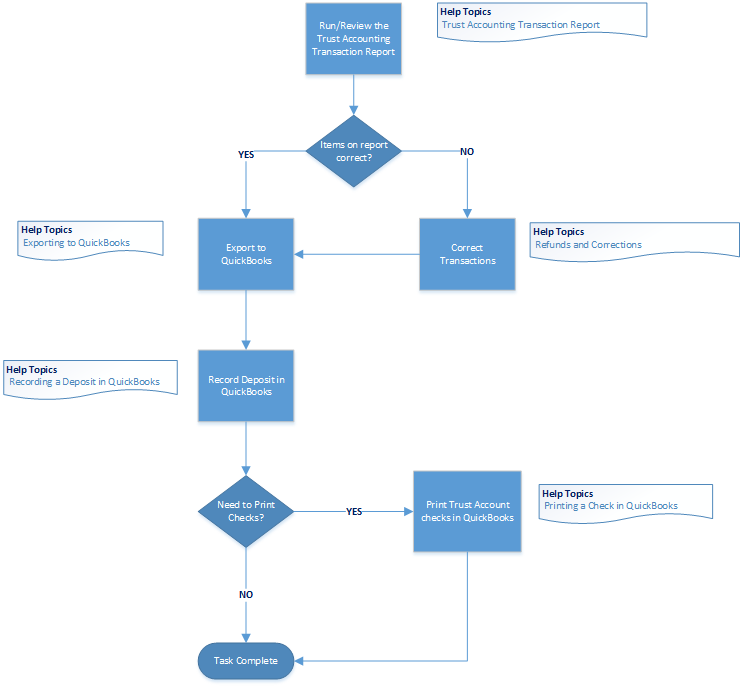
The objective of the Trust Transaction Review process is to record the deposit of customer payments in QuickBooks® and print checks from your Trust account. Recording deposits includes verifying customer receipts by running the Review Trust Accounting Report for all receipts entered into HawkSoft for a particular period. Comparing the report against the funds to be deposited is a way to check the accuracy of the receipts.
 Close of Day Workflow
Printable PDF
End of Day Workflow Videos
Trust Transaction Review Workflow
Trust Transaction Review Summary
Reviewing the HawkSoft Trust Accounting Report
Before recording the deposit in QuickBooks, run the Trust Accounting Report for the time-frame in which receipts for the payments were created. When you review a Trust Accounting Report, compare the day's deposit total with the information on the report. This should account for all cash, check and credit transactions.
Accounting Reporting and Processing
Exporting Transactions to QuickBooks
HawkSoft enables you to export receipts, invoices, and credit memos from HawkSoft to QuickBooks®.
This article describes the process for exporting transactions from the Trust Accounting Report to QuickBooks. Transactions are typically exported to QuickBooks at the end of the day, in the course of preparing funds to deposit to the agency Trust account, and/or when preparing checks to be printed from QuickBooks.
Recording the Deposit in QuickBooks
Once the items from the Trust Accounting Report have been successfully exported to QuickBooks, all payments will appear in the Undeposited Funds account to await deposit to the appropriate bank account.
This process involves selecting payments in the QuickBooks Bank Deposit dialog, and then printing a deposit slip and/or summary (optional).
Recording a Deposit in QuickBooks
Printing Checks in QuickBooks
Once the items from the Trust Accounting Report have been successfully exported to QuickBooks, all checks to be printed will appear in the Print Checks window in QuickBooks ready for you to send to the printer.
Printing a Check in QuickBooks