Process Unmatched Carrier Downloads
HawkSoft enables your agency to receive downloaded policy information from carriers. In most cases, HawkSoft will be able to match these carrier downloads to the correct clients and policies in your database automatically, and attach the downloads and update the policies without any user input needed. However, in some cases HawkSoft might not be able to locate the correct client and policy for a download. This can happen if there's a mismatch between certain information on the policy download and the policy in HawkSoft (for example, the download has dashes in the policy number, but the policy's number in HawkSoft does not).
This article explains how to use the Downloads Dashboard to see unmatched downloads, and how to manually match them to the correct policies.
Locating Unmatched Downloads
-
Open your Unmatched Downloads via one of the following methods:
 Directly from the start page
Click on the Unmatched Downloads link under Quick Links in the left side-bar of the Start Page.
The Downloads Dashboard opens directly to the Unmatched Downloads page.
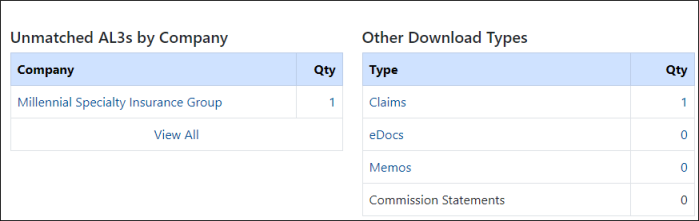
There are two columns of unmatched downloads listed:
 Through the HawkSoft menu bar
-
Click Activities, and then select Download Dashboard.
OR
-
Log into the HawkSoft Web app, accessed from any computer.
-
Click the Download icon
 in the left column of the HawkSoft web start page to access the Carrier Download Dashboard
For more information about logging into the HawkSoft web app, see Logging In and Out of HawkSoft.
The home page of the Downloads Dashboard opens in your web browser.
Unmatched Downloads
If you have received any downloads that HawkSoft was unable to definitively match, you'll see a warning at the top of the Downloads dashboard:

In addition, the Work in Progress table will show how many downloads need manual processing under the Unmatched column.

-
-
Click the link in the 'unmatched items' notification, or click on the number in the "Unmatched" column in the Work in Progress table.
The "Unmatched Downloads" page opens.
There are two columns of unmatched downloads listed:
-
-
Click on a company to see a specific carrier's unmatched policy downloads, or click "View All" to see all unmatched policy downloads.
OR
Click on an Other Download Type to view unmatched downloads of that type.
Match the downloads to a client/policy
Now that you've located your unmatched downloads, you'll need to tell HawkSoft what to do with them. This process will look a little different depending on whether you're working with policy (AL3) downloads, or an Other type download.
To match AL3 Policy Downloads
If you have an unmatched policy download (also known as AL3 download), you can tell HawkSoft which client/policy it should be matched to. If the client exists, but the policy doesn't, then you can tell HawkSoft to create the policy on the existing client using information contained in the download. If neither the client nor the policy exists in your HawkSoft system yet, you can tell HawkSoft to create both the client and the policy using information on the download.
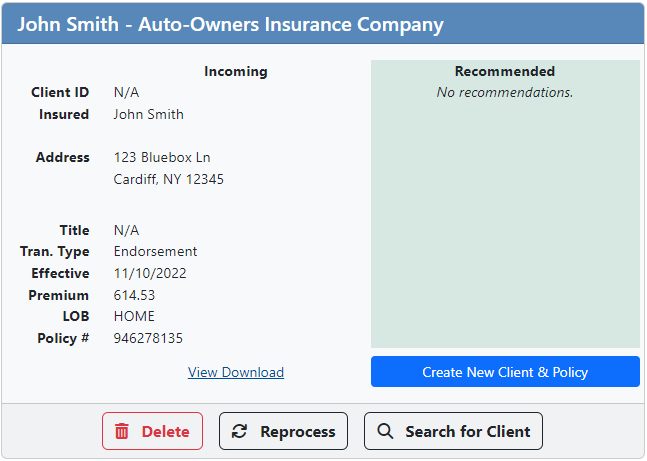
Each unmatched download appears on a card on this page, including a summary of potential identifying information:
If the download belongs to an existing policy on an existing client, you can tell HawkSoft which client and policy to match the download to.
From the Unmatched Download card located in the previous steps, confirm whether HawkSoft has found a recommended match (shown on the right side of the unmatched download card).
You can click View Download to open the unmatched download in the Downloads Viewer. This enables you to thoroughly review the information contained in the download to confirm whether or not the download belongs to a recommended match.
If there is a recommended client and policy, and both are correct:
Click Update this Policy on the unmatched download card.
Click Commit (Update Policy) to confirm that this download should be matched to the recommended client and policy.
The download is matched to the recommended policy, and the policy is updated using information contained in the download.
If there is a recommended client and it is correct, but no recommended policy:
If HawkSoft recommends the correct client to an unmatched download, but does not recommend a policy to the download (and you are sure the policy does not exist on the client in HawkSoft), you can quickly create a new policy on the recommended client using the unmatched download.
Before creating a new policy on a client, open the client to make sure that the policy contained in this download does not already exist in HawkSoft.
If the policy already exists on the client in HawkSoft, but HawkSoft does not show this policy as a recommendation (or shows the wrong policy), follow the steps under 'If the recommended client and/or policy is incorrect:
Click the Create New Policy on Client button on the unmatched download card.
The Creating Policy from Download dialog launches.
Client
If a Client Office, CSR, and/or Producer have already been set for the client, the information will flood into each field and can be modified as needed.
If a Client Office, CSR, and/or Producer have not been set for the client, you can start typing into each field to search for and select the desired office, CSR, and/or Producer.
Policy
Select an office for this policy from the Office (Required) drop-down. You can start typing the office name into the field to filter the list.
If default agents were set for the selected office in Office Setup, the office's default Agents will flood into the fields. If no default agents were set, or if they should be changed for this policy, select Agents 1-3 from the drop-downs as needed.
Client
If a CSR and/or Producer have already been set for the client, the information will flood into each field and can be modified as needed.
If a CSR, and/or Producer have not been set for the client, you can start typing into each field to search for and select the desired office, CSR, and/or Producer.
Policy
Select agents 1-3 from the drop-down fields as needed.
If default agents were set for your agency in Agency Setup, the default agents appear in the fields. If no default agents were set, or if they should be changed for this policy, select Agents 1-3 from the drop-downs as needed.
- Click Commit (Create New Policy on Client) to create the policy on this client.
If the recommended client and/or policy is incorrect:
If there is an existing client in your HawkSoft data to match with this download, but there is not a policy on this client that matches this download, you can tell HawkSoft to create the policy on that client using the information in the download. You can also manually select the policy to update, if it exists but was unable to be matched by HawkSoft for any reason.
Click the Search for Client button on the unmatched download card.
A client search window opens. The name from the download is pre-filled in the search.
Edit the search information if needed, then click Search.
If a client is found, the search results display in the lower half of the window, including a list of the client's policies.
Click Use Policy on that row.
Click Commit to confirm creating or updating the policy on the selected client.
OR
Click Create Policy.
The Creating Policy from Download dialog launches.
Client
If a Client Office, CSR, and/or Producer have already been set for the client, the information will flood into each field, and can be modified as needed.
If a Client Office, CSR, and/or Producer have not been set for the client, you can start typing into each field to search for and select the desired office, CSR, and/or Producer.
Policy
Select an office for this policy from the Office (Required) drop-down. You can start typing the office name into the field to filter the list.
If default agents were set for the selected office in Office Setup, the office's default Agents will flood into the fields. If no default agents were set, or if they should be changed for this policy, select Agents 1-3 from the drop-downs as needed.
Client
If a CSR and/or Producer have already been set for the client, the information will flood into each field and can be modified as needed.
If a CSR, and/or Producer have not been set for the client, you can start typing into each field to search for and select the desired office, CSR, and/or Producer.
Policy
Select agents 1-3 from the drop-down fields as needed.
If default agents were set for your agency in Agency Setup, the default agents appear in the fields. If no default agents were set, or if they should be changed for this policy, select Agents 1-3 from the drop-downs as needed.
Click Commit (Create New Policy on Client) to create the policy on this client.
You have successfully attached the download to the correct policy on the existing client and updated it, or created a new policy on the existing client from the download.
If there is no existing client in your HawkSoft data to match with this download, you can create a new client as well as the policy, using the information contained in the download.
Even if you are sure that the client on the download is not already in your HawkSoft Database, HawkSoft recommends searching for a potential matching client before creating a new client using this download, to avoid potential duplicates.
From an unmatched download card:
Recommended: Click Search for Client to search your HawkSoft database and ensure that this client does not already exist.
A client search window opens. The name from the download is prefilled in the search.
- Edit the search information if needed, then click Search.
If no client is found, proceed with the next steps to create a new client using information contained in the download.
If a matching client is found, follow the steps under 'If the recommended client and/or policy is incorrect:
Click Create New Client & Policy.
The Creating Client and Policy from Download dialog launches.
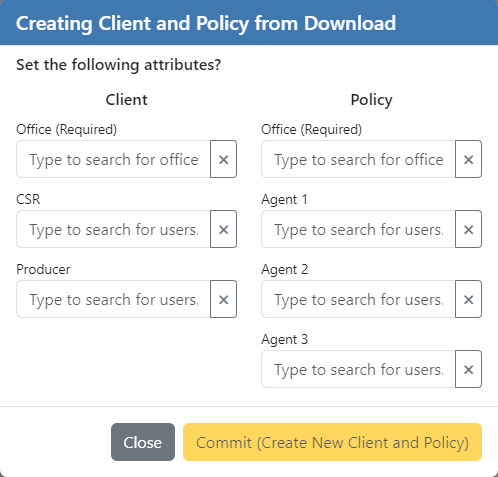
Select an office for both the client and the policy from the Office (Required) drop-downs in each column. You can start typing the office name into the field to filter the list.
If Default Agent Information is set for the selected office in Office Setup, the CSR, Producer, and Agent fields will show the office's default users. If no default CSR/Producer/Agents were set, or if they should be changed for this client/policy, select them from the drop-downs as needed.
Modify the the Client CSR, Producer, and Policy Agents as needed.
If Default Agent Information is set for your agency, the agency's default Client Producer and CSR, and default Policy Agent(s) appear in the fields. If the Producer, CSR, and/or Agent(s) should be different for this policy, you can change the fields as needed.
Click Commit (Create New Client and Policy) to finish.
The unmatched download is removed from the unmatched list, and you have successfully created a new client and policy from the download information. A copy of the download is attached to the policy.
To match Other Download Types
When matching any downloads found under Other Download Types, the matching process differs a bit in that you will only be selecting which client and policy these documents will be attached to.
See Types of downloads and how they are matched for more information about download types.
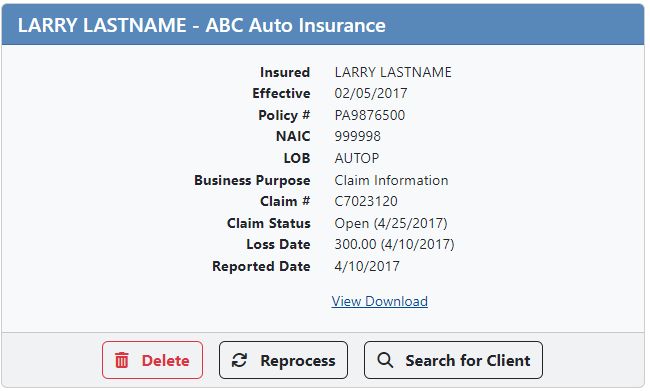
The cards for these other types of unmatched downloads look a bit different. Because they don't contain data formatted to update a policy, there's no recommendation and you can't create a client or policy from them.
-
Optional: Click View Download to open the unmatched download for review.
- Click the button Search for Client on the unmatched download card.
- A client search window opens. The name from the download is prefilled in the search.
- Edit the search information if needed, then click Search.
- If a client is found, the search results will be displayed in the lower half of the window, including a list of the client's policies.
-
Click Use Policy on the row for the policy you'd like to attach the document to.
-
Click Commit to attach the document to the policy. The unmatched download is removed from the unmatched list and attached to the chosen policy.
You have successfully attached the download to the correct policy.
Recently Matched Downloads
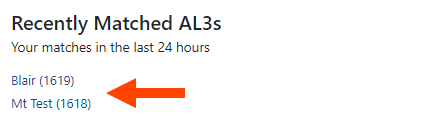
HawkSoft provides a list of all downloads that have been processed from Unmatched Downloads within the past 24 hours. This will help your agency review downloads you have processed within the past day and make changes to the client/policy as needed. A link to the client, matched with the download, is available for quick access directly to the client.
Recently Matched AL3s, Claims, and eDocs are available from the Unmatched Downloads dashboard and when you are processing Unmatched downloads.
To delete an Unmatched Download
Deleting an unmatched download permanently erases that download. If an unmatched download was deleted in error, the carrier will need to send a new copy of the download.
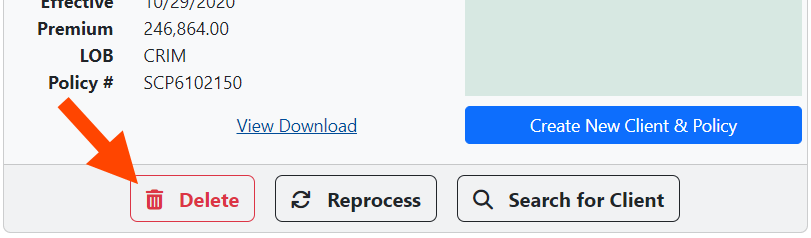
If you have an unmatched download that does not need to be processed (for example, duplicate downloads), you can delete it by pressing the  button on the unmatched download card.
When you press Delete, you'll see a pop-up confirming you truly do want to delete the download:
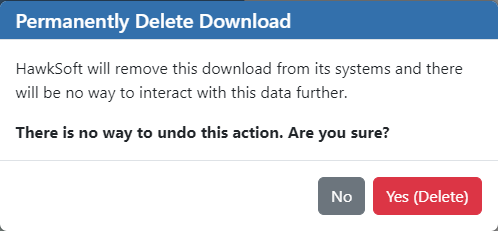
Click Yes (Delete) to delete the download.
To reprocess Unmatched Downloads
If you know that the client/policy a download should be matched to has been updated since the download came in, you can  the download, rather than manually matching it to the correct client and policy.
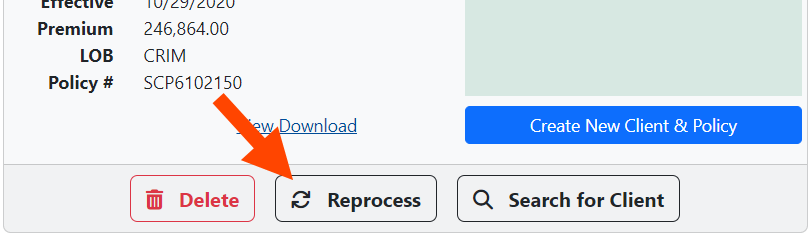
Once you click Reprocess the download runs through the automated matching process again using the most recent client and policy information in your HawkSoft database. This confirms that the missing information has since been added to the client/policy.
If the download process finds a match, it will queue the download for automatic matching and processing, and remove it from the Process Unmatched Items screen. If a match is not found, the download will simply return to the Process Unmatched Items screen.
If you have multiple unmatched downloads that you'd like to reprocess all at once, click the  button to the upper right of the unmatched download cards. This will check all of the unmatched downloads for potential matches again.
Types of downloads and how they are matched
Downloads are matched to a client/policy in HawkSoft by policy number as well as line of business, and then processed in accordance with your Download Rules.
The following table describes the different types of downloads and how HawkSoft processes them.
Download Rules must be set to enable the different download types to update policy information.
| Download Type | Description | Attaches/Updates Policy? | Unmatched Downloads |
|---|---|---|---|
| Policy Download | ACORD Policy downloads contain new policies or updated information for existing policies. |
When matched to a policy number and LOB, these downloads can automatically:
|
If either the line of business or policy number in the download does not match, the download goes to the Unmatched Downloads. |
| EDocs and Memos | ACORD standard downloads that include a variety of messages and documents from carriers. |
When matched to a policy number, these downloads can automatically attach to a policy. However, these downloads do not automatically update any policy information. |
When matched to more than one policy, or none, the download will go to the Unmatched Downloads. |
| Claim |
ACORD standard downloads that include claims details, such as claim adjuster information and claim payment notifications. |
When matched to a policy number and LOB, these downloads can automatically:
When also matched to a claim on a policy:
|
|
Required permissions
In order to complete this task, user permissions must be set to include:
Downloads > Downloads Dashboard and Report > Unmatched Downloads
Client Actions > Change Client Office
Client Actions > Change Client Producer/CSR
See User Permissions for more information.
Related Topics