Sandbox Exercise - Insert a Policy
In HawkSoft 6, Auto and home policies can be combined as packages, no need for a separate tab. This exercise will walk you through inserting a package policy on a client that contains personal auto and home lines of business.
This exercise is for training purposes, and is intended for use in your sandbox environment.
-
Retrieve a client.
For help on searching for a client file, see Client Search.
-
Select Phone > From > Insured > Insert Policy > Personal from the action menu.
-
Review all of the information on the Name and Address tab, the same way you would in Version 5.
-
Select the Policy Information tab, and set the Carrier to <Prospect>.
-
In the Lines of Business list, select AUTOP.
Notice that HawkSoft has added tabs for Drivers and Vehicles.
-
Select a second Line of Business of HOME.
Notice that HawkSoft has added tabs for Coverages, Watercraft, and Scheduled property.
-
Optional: Continue filling out some basic policy information.
This will let you see more details about how home, auto, and package policies are displayed in Version 6.
-
Recommended: Observe the interaction between Locations and Vehicles in HawkSoft 6.
-
Click on the Locations tab.
-
Click New Location.
The New Location and Buildings dialog opens.
-
Enter the information for a new location.
For this example, we can enter the location where an insured's child has taken an insured vehicle with them to college.
-
Click OK to add the location to the policy.
-
Click on the Vehicles tab.
-
Click Add.
-
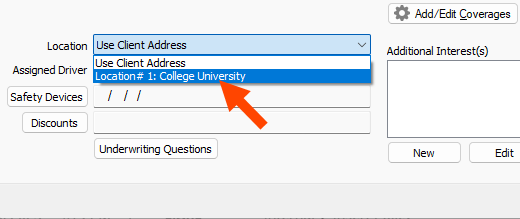
Note that the location you previously added to the policy is now selectable from the Location drop-down when entering a vehicle.
-
-
Click Finish when you are done filling in policy information.
-
Create a Log Note in the Finalize Log dialog.
The new policy shows on the client.
-
Examine the newly created policy.
Note that the Auto and Home Lines of business are listed on a single policy tab, as a package.
Congratulations! You've inserted a policy including both Home and Auto in a package and completed the Insert a Policy exercise.
For more information about policies and how your agency can track them in HawkSoft, see Policy Overview.
 Related Topics