HawkSoft supports your agency's Sales Pipeline to help track and report on prospects and ensure new policies move through the process from discovery to sold.
It is important that prospect policies are inserted into HawkSoft for the following reasons:
- Document initial conversations – Important conversations regarding advisement of coverages, etc. usually take place before the sale is made or coverage is bound. By inserting a Prospect policy in HawkSoft, you can document all conversations with the customer for a permanent record, reducing E&O exposure.
- Create Tasks for follow up – Often times follow-up is required on policies that are not active yet, for example you may need to follow up on submissions to carriers for quote and/or approval, or you may need to request important documentation from your prospect to be able to provide an accurate quote. Insert a Prospect policy so you can document what is needed and create a Task for follow-up to ensure the policy doesn’t slip through the cracks.
-
Utilize Sales Pipeline reports - These reports enable you to follow up on submissions, quotes, or proposals. For example, you might want to reach out to a prospect 10 months after they refused your initial quote due to price. You can use the Sales Pipeline report to track these prospects. Never miss an opportunity!
This article provides an overview of the three components of the Sales Pipeline:
First things first! Get your agency set up for success
It is important to configure HawkSoft to use the Sales Pipeline correctly, for accurate reporting.
Set your defaults for new prospects
To encourage your agency to utilize the Sales Pipeline, go into your General Settings and select:

When this setting is selected, new policies will automatically have the Policy Status and Company set to Prospect.
Make sure you have set up all of your lines of business under the Prospect Company in Carrier Setup.
Customize your Sales Pipeline Sub-Statuses
Now that your agency is set up to insert prospects, you can configure your policy sub-statuses to reflect your agency's workflow.
HawkSoft's default workflow:
| Status | Default Sub-Status | Description |
|---|---|---|
| Lead |
Indicates possible interest. Example: An existing client mentions they might be purchasing a vacation home. You can enter a new Home policy with a Status of Lead and follow up with the client at a later date. |
|
| Unqualified |
Client insurance needs are unknown. Example: A list of leads in a residential zip code. |
|
| Qualified |
Client insurance needs are known. Example: A mortgage broker has sent a list of recent mortgage applicants. |
|
| Prospect |
The client is interested in receiving a quote. The policy has not been sold. If your agency has configured default tasks to trigger when the status of a policy is changed to Prospect or New, then a task is automatically created and attached to the log note. |
|
| Discovery | The agency is gathering information needed for underwriting and quoting. | |
| Submission |
The agency has submitted the application to its carriers for approval and/or quote. Use Submission Tracking in HawkSoft to track the status and details of the application. SeeTrack Submissions for more information. |
|
| Quote | A quote/offer has been extended to the client. | |
| Proposal | The agency has issued a formal insurance proposal to the client. | |
| Refused | The client declined the quote/proposal. | |
| Price | The client declined due to price. | |
| Didn't Buy Risk | The client did not proceed with purchasing the item to be insured. | |
| Rejected | The policy has been disqualified. | |
| U/W Rejected | The Underwriter rejected the client's application. | |
| Agency Disqualified | The policy doesn't meet the agency's standards. |
To customize your Sub-Statuses to reflect your agency's workflow, See Sales Pipeline Configuration for detailed steps.
Now your agency is ready to insert prospects
When a prospect policy is entered, the Status defaults to Prospect. Choose a Sub-Status to clarify the specific stage of the policy in the Sales Pipeline. As your policy enters another stage, you can change the Sub-Status. Your Sales Pipeline reports will help track your prospects and help you move those policies to Sold.
See Insert a Prospect: Sales Pipeline for more information.
Reporting: Keep the prospects moving through the pipeline
Sales Pipeline reports contain several options to track the status of policies in the Sales Pipeline. You can select reports based on a specific status as well as reports based on a sub-status.
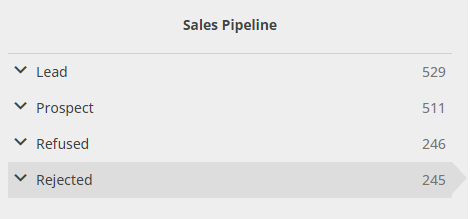
Eachreport includes metrics to enable your agency admin to make data driven decisions about how the sales team is performing and closing on sales. These reports help identify where the issues are in the sales funnel for your agency.
See Sales and Retention Reports for more information.
Important data for the Sales Pipeline
These fields will help you track policies as they move through the Sales Pipeline. Some of these fields are required on all policies, as specified in the table. In addition, you can require some additional fields when entering a prospect. These fields are listed as "Customizable". For more information, see Sales Pipeline Reporting.
| Field | Required? | Description |
|---|---|---|
| Agent | Customizable | HawkSoft has space for 3 policy-level agent fields. These fields are used in commission calculation. |
| Application Type | Yes | Used by HawkSoft to categorize insurance lines for reporting purposes and to set the default Policy Title when multiple LOBs are packaged together. Application types listed in HawkSoft include Personal, Commercial, Agriculture, Life, Health, Bond, Employee Benefits, Other, and (No Policy). |
| Company | No | The policy carrier. Policies in the Sales Pipeline can be set to <Prospect>, instead of being assigned to a specific carrier. |
| CSR | Customizable | Customer Service Representative. This is typically used by agencies that want to define/track the primary point of contact for policy maintenance (not sales). |
| Line of Business | Yes | The policy line of business. |
| Proposed Effective Date | No | The date the policy is expected to go into "effect". All of the Sales Pipeline reports are generated based on Proposed Effective Date. |
| Producer | Customizable | The Producer/Agent who originated the business relationship, or made the initial sale to the client. |
| Status | Yes | The status of a policy in HawkSoft indicates where that policy is in the Sales Pipeline. |
| Status Date | Yes | This is the date the policy Status was set to Prospect. This date will change each time the Status is changed to another Sales Pipeline Status. |
Sales Pipeline Status Cleanup
Keeping your Sales Pipeline statuses up to date helps you track your sales activity and identify why leads have not become customers. Follow the steps in the video to learn how to keep your Sale's Pipeline clean.
 Related Topics