HawkSoft enables you to create a Policy Snapshot after making changes to a policy. The Policy Snapshot document looks like a policy download (AL3) file, and includes basic policy information, such as carrier name, Insured's contact information, premium, policy dates, vehicle information, coverages, etc.
When a carrier does not do downloads, using the Policy Snapshot feature is a good way to track and compare manual changes made to a policy over time.
Once the Policy Snapshot is created, it is attached to the policy and the log note. You can open the attachment from the policy, just like opening a policy download attached from a carrier. Like policy downloads, the Download Compare tool can be used to compare two different Policy Snapshot files.
Prior to v4.9, Policy Snapshot was called Policy History. The Attachments list might contain Policy History documents saved prior to v4.9.
This article explains how to configure the Policy Snapshot feature for your agency and how to review Policy Snapshots after they are attached to a client/policy.
This task is typically performed by an Owner/Administrator, Manager, or CSR/Producer.
 To configure Policy Snapshot settings
HawkSoft enables you to configure your agency to use the Policy Snapshot feature consistently for all policy changes, while allowing for the flexibility your agency might need. You can configure Policy Snapshots in General Settings, as well as set overrides for specific carriers in Carrier Setup.
General Settings
Click the
Settings icon, and then select General Configuration > General Settings.
Required Permissions:
In order to complete this task, user permissions must be set to include:
Agency Setup > General Configuration
See User Permissions for more information.Policy Snapshot Setting
Check this box to enable the Policy Snapshot feature and to configure how Policy Snapshots are created for policy changes. If left unchecked, Policy Snapshots will not be created when changes are made to a policy.
A Policy Snapshot can be created from the Internal Action menu without any configuration. See Internal Action menu options for more information.
Select one of the following options from the available drop-down to determine how Policy Snapshots are created for your agency. This setting can be overridden for specific carriers in Carrier Setup.
Automatically create Policy Snapshot – Each time changes are made to a policy, a Policy Snapshot will automatically be created and attached to the policy.
Do not create Policy Snapshot (unless overridden) – You might want to select this option rather than leaving the main Policy Snapshot option unchecked, if you don't want to create a Policy Snapshot for most policy changes. This option enables you to set an override for specific carriers that you do want to create a Policy Snapshot for. For example, you might want to create a Policy Snapshot only for carriers that don't download policy changes.
Prompt users before creating Policy Snapshot – Each time changes are made to a policy, the user will be prompted with the option to create a Policy Snapshot.
Carrier Setup Override
Click the
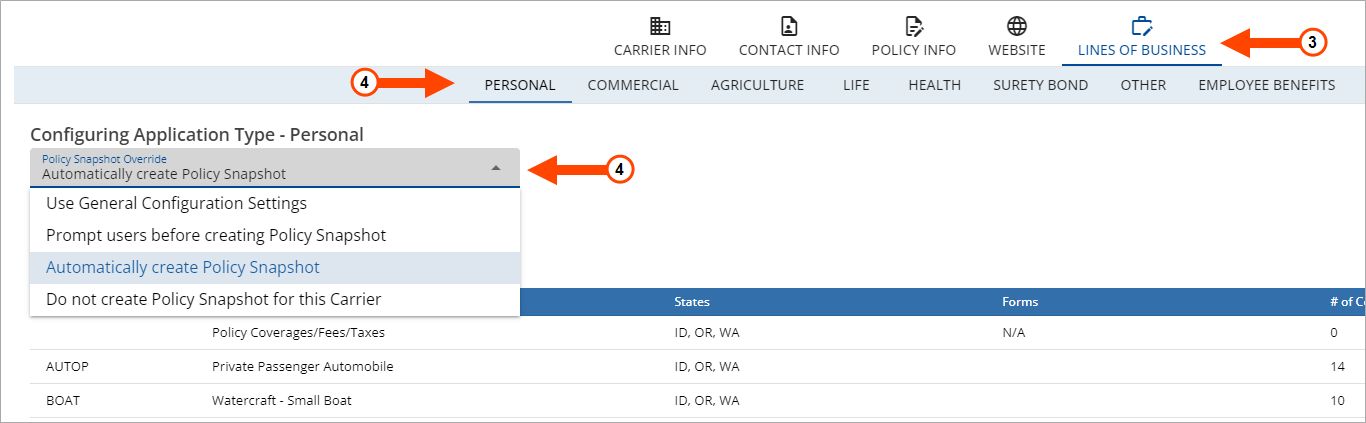
Once the Policy Snapshot setting is enabled in General Settings, you can override the default setting for specific application types for each carrier on the Lines of Business tab in Carrier Setup.
Required Permissions:
In order to complete this task, settings must be set to include:
Agency Setup > General Configuration
Agency Setup > Carrier Setup
See Carrier Setup Overview for more information.
Click the
The Carrier Setup dialog opens.
Select a carrier.
The Editing Carrier dialog opens.
Select the Lines of Business tab.
Select an application type, and then select an option from the Policy Snapshot Override drop-down menu.
The available drop-down defaults to Use General Configuration Setting.
This is the setting selected on the General Settings screen. You can override the default setting for the selected carrier by selecting one of the following options from the drop-down.
To ensure that a setting remains for this carrier, and is not impacted by a change to the default setting in General Settings, avoid using the Use General Configuration Setting option.
Prompt users before creating Policy Snapshot – Each time changes are made to a policy with this carrier, the user will be prompted with the option to create a Policy Snapshot.
Automatically create Policy Snapshot – Each time changes are made to a policy with this carrier, a Policy Snapshot will be automatically created and attached to the policy.
Do not create Policy Snapshot (unless overridden) – A Policy Snapshot will not be created for this carrier.
You can set a Policy Snapshot Override option for each application type for the carrier.
Click Save to save the Policy Snapshot Override settings.
 To create a policy snapshot
Based on your agency settings, HawkSoft may automatically create or prompt you to create a policy snapshot after making a change to a policy.
Required Permissions:
To perform this task, no specific HawkSoft user permissions are required.
Open the desired client file.
Select the policy you wish to make a change to.
- Click Action, and then select one item in each of the first three lists to describe what prompted this transaction.
Select Change Client/Policy, and then make changes as needed.
Click Finish from the client/policy dialog.
A Change Form may open depending on your General Configuration settings. Click OK to close the Change Form.
You may be prompted to create a policy snapshot. Click Yes.
Click Finish on the Action Menu.
The Add Log Entry Comments dialog opens with the Policy Snapshot automatically attached to the log note.
For a HawkSoft generated attachment such as a Policy Snapshot or a Change Form, you can click the attachment link to open and view the attachment or click the
 Edit icon to edit the Attachment Properties, if needed.
HawkSoft recommends that you do not edit the attachment properties for HawkSoft generated attachments for E&O purposes.Add any comments to the Add Log Entry Comments dialog as needed, and then click Save Log.
The Policy Snapshot can now be found attached to the log note from the Logs tab on the policy, or it can be found under Downloads/Snapshots from the Attachments tab.
To manually create a policy snapshot using the action menu
A Policy Snapshot can also be manually created from the Action Menu if a policy snapshot was not automatically created.
Open the client file.
Select the policy you made a change to.
Click the Action Menu.
The Action Menu opens.
Select Internal, and then select Create Snapshot.
The Add Log Entry Comments dialog opens with the Policy Snapshot automatically attached to the log note.
For a HawkSoft generated attachment such as a Policy Snapshot or a Change Form, you can click the attachment link to open and view the attachment or click the
Edit icon to edit the Attachment Properties, if needed.
HawkSoft recommends that you do not edit the attachment properties for HawkSoft generated attachments for E&O purposes.Add any comments to the Add Log Entry Comments dialog as needed, and then click Save Log.
The Policy Snapshot can now be found attached to the log note on the Logs tab for the policy, or it can be found under Downloads/Histories from the Attachments tab.
Reviewing the snapshot of a policyWhen a Policy Snapshot is created, it is attached to the policy just like a downloaded policy change.
To view a Policy Snapshot
Select a Policy Snapshot from the Downloads/Histories tab on the Attachments List, and then use the right-click menu to select one of the following options:
View – Double-click the policy snapshot to open the file to review policy information.
Compare to Previous – Select to use the Download Compare tool to compare the selected Policy Snapshot with a previous Policy Snapshot. See Comparing Downloads and Policy Snapshots for more information about this feature.
See Attachments right-click menu options for information about additional right-click menu options.
 Related Topics