The Attachments List
When documents are attached to a client/policy, they are listed in the Attachments tab. HawkSoft enables you to open and manage attachments from the Attachments List.
This article will help you navigate the list of Attachments from a policy tab (or the Client tab).
See Importing and Attaching Documents to Clients and Policies for more information about attachments and the methods used to attach documents to clients and policies.
For a list of helpful articles on opening, modifying, sharing, and managing attachments, see Attachments Overview.
Can't find an attachment? Check your attachment filters.
See To search or filter attachments for more information.
 Required Permissions
Required Permissions:
In order to complete this task, user permissions must be set to include:
Client Access > You must have permission to the Client type you are accessing attachments for.
See User Permissions for more information.
Attachments column information
The following information is displayed for each attachment to provide a history of changes made to the policy:
You can click the  Column Options button to reorder the Attachments List columns.
| Column heading | Description |
|---|---|

|
An icon that indicates the attachment's file type. An |
| Date Attached | The date the file was attached. |
| Description | The description is entered for the document at the time it is attached, and can be modified in the Properties dialog. When a user archives an attachment, the system adds (ARCHIVED) to the beginning of its description. |
| Category |
The category entered for the attachment. The category enables you to group the attachments on the Attachments screen. See Customize Lists and Menu Options Overview to modify the options on the Attachment Categories list. |
| File Type | The type of file attached. |
| User | The user who attached the file. |
| Effective Date | The effective date of the attachment. |
| Premium |
When an attached download updates the policy premium, the new premium appears in this column. Additionally, you can choose to add a premium amount on manually attached documents. The Premium can be modified in the Properties dialog. |
| Premium Change |
Premium change applies only to new business, policy change, rewrite, re-issue, renewal, or renewal quote downloads. When a download updates the policy premium, the difference between the previous downloaded premium and the current downloaded premium amount appears in this column. |
| Policy |
The policy that the attachment is associated with. If blank, the attachment is attached directly to the client itself (i.e. under the Client tab). This column only appears if Show Attachments for All Policies is enabled. |
 Info icon indicates a missing attachment. Hover over this icon to see more information.To search or filter attachments
The Attachments List contains contains several filter options to help you quickly narrow down the list and easily find attachments.
You can use any combination of filters, search options, and sorting to refine which attachments you currently see. Additionally, you can click the Column Options button to reorder the Attachments List columns.
Filter Options
Show attachments for all policies - If this option is unchecked, only attachments from the selected policy tab will appear.
HawkSoft will remember your last selected Show attachments for all policies option. If the box is checked, then all attachments for all policies on the client will display on the Attachments tab the next time you launch any client.
Attachments - Select to view attachments including all PDF documents, ACORD forms, and Image files, as well as all other attachments not listed under Downloads.
Downloads - Select to view downloads and policy snapshots.
Policy Snapshots are attachments that provide a historical record of a policy's information at a given time. Policy Snapshots can be created each time a significant change is manually made to a policy, depending on your agency's global Policy Snapshot setting in General Settings, as well as the Policy Snapshot Override setting for the carrier in Carrier Setup.
See Policy Snapshot to learn more about how to set up and work with Policy Snapshots.
Archived - Select to view attachments marked as archived in the list of attachments.
Search Options
Group By - Use this drop‑down to choose how you want to organize the attachment list. You can select additional search options to filter your list. Select None to remove the grouping.
Description – Enter any text used for the description of the attachment(s) you are looking for.
User – Enter the initials or name of the user who attached the file(s) you are looking for.
File Type - Use this drop-down to choose which type of attachment file(s) you are looking for.
Category - Use this drop-down to select the category of attachment(s) you are looking for.
Rate Change History
The Rate Change History link is located in the upper right of the Attachments tab view screen, and launches the Rate Change History dialog.

The Rate Change History table lists all of the download transactions on this policy, including their purpose, their effective date, any change in premium, and the percent of change for the premium, if any. Actual transactions are not compared to Renewal Quotes or Re-Quotes.
Click a transaction type link to open the associated carrier download for further details.
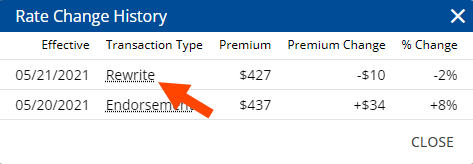
Rate change history only shows downloads processed by HawkSoft, and does not include manual policy updates.
See Downloads Viewer for more information about reviewing carrier download files.
Related Topics