The HawkSoft Desktop Start Page
The Start Page enables you to quickly view a summary of your assigned tasks, stay up-to-date on agency announcements, view the latest HawkSoft news and release highlights, and easily navigate to a variety of commonly used tools, features, and resources in HawkSoft.
 Required Permissions
Required Permissions:
To access the Start Page, no specific HawkSoft user permissions are required.
You can navigate back to the Start Page at any time by selecting the Start Page tab on the client bar, or by selecting the Start Page option from the View menu.
The Start Page contains the following:
-
Agency Logo - If set up by your agency administrator or manager, this section displays your agency's logo. To learn more, see Custom Agency Logo.
-
Tasks - This section displays a summary of your assigned tasks, grouped by due date and status. Click on a group to launch the Task Center and view your assigned tasks. To learn more, see Tasks Overview.
-
Announcements - If set up by your agency administrator or manager, this section displays your agency's custom announcements such as agency news, company goals, and events. To learn more, see Agency Announcements.
-
HawkSoft Corner - This section displays HawkSoft news and upcoming events, and provides links to useful HawkSoft resources such as Tips and Tricks, the Release Highlights, HawkSoft Contact Information and Chat Support, and HawkSoft Community.
Click Release Highlights to view the latest notable enhancements to HawkSoft. From this dialog you can also open What's New to view previous release highlights, watch brief tutorials, and learn more.
-
Start Page Settings - Click the
 menu icon to open the Start Page Settings. From this menu, you can opt to Hide Alerts.
 Additionally, agency administrators or managers with General Configuration permissions enabled can opt to Hide/Show Logo or Hide/Show Announcements for their entire agency from the Start Page Settings menu.
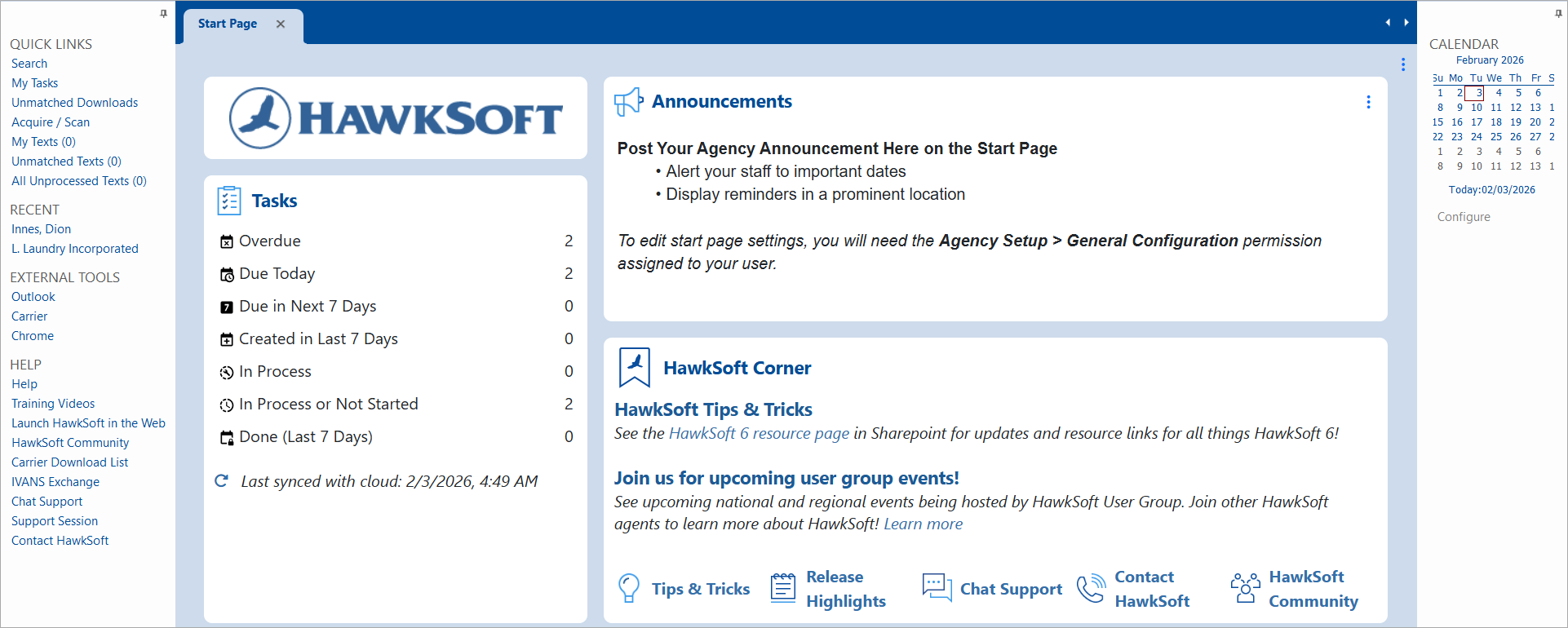
The side-panels enable you to easily access links to frequently used features and quickly view your personal calendar.
The left-hand side-panel
The left-hand side-panel contains links to frequently used features, recently accessed clients, and links to help and other resources.
You can click the  pin icon to pin the panel in place. When pinned, the side-panel will display when viewing the Start Page and clients.
Click the pin icon again to unpin the panel and hide it from your view. The panel will remain accessible via a small side-tab.
Some of the options listed below are only visible and accessible from the side-panel if you have permissions. See User Permissions for further details.
| Quick Links | |
|---|---|
| Search |
Click to open the Search dialog. From this dialog you can perform a client search and launch the client in HawkSoft. See Client Search to learn more. |
| My Tasks |
Click to open the Task Center. From the Task Center you can view, create, and track your assigned tasks. The number displayed next to the link shows the how many tasks assigned to you are due today or overdue, synced with the HawkSoft servers every 3 minutes. See Tasks Overview to learn more. |
| Unmatched Downloads |
Click to open the Unmatched Carrier Downloads Dashboard in a new web browser. From Unmatched Downloads you can view your unmatched carrier downloads and manually match them to their associated clients/policies in your HawkSoft Database. This option displays only if you have user permissions enabled for Unmatched Downloads. See Process Unmatched Carrier Downloads to learn more. |
| Unmatched Documents |
Click to open the Unmatched Documents Inbox, where you can browse and attach documents stored in the folder, such as scans or faxes, to the relevant clients and policies. The number next to the link displays the amount of items in the inbox, updated every 3 minutes. See Processing Unmatched Documents to learn more. |
| Acquire/Scan |
Click to open the HawkSoft Scan Utility. The Scan Utility enables you to easily scan and attach documents directly to clients. See Scanning Documents to learn more. |
| My Texts |
Click to open the My Texts dialog. The My Texts dialog displays all unprocessed text messages for clients which have you listed as a CSR or Producer, as well as all clients you have chosen to follow. This option displays only if HawkSoft Text Messaging has been purchased and configured for your agency. See My Texts to learn more. |
| Unmatched Texts |
Click to open the Unmatched Texts view. The Unmatched Texts view displays text messages from phone numbers not currently associated with a client. This option displays only if HawkSoft Text Messaging has been purchased and configured for your agency. See Unmatched Texts to learn more. |
| All Unprocessed Texts |
Click to open the All Unprocessed Texts view. The All Unprocessed Texts view displays all unprocessed text messages across all of HawkSoft, organized by phone number, regardless of user permissions to view clients. This option displays only if HawkSoft Text Messaging has been purchased and configured for your agency. See All Unprocessed Texts to learn more. |
| Recent | |
|
Displays a list of your most recently accessed clients in HawkSoft. You can modify the number of recent clients that display in this section from User Preferences. |
|
| External Tools | |
|
Displays a list of shortcuts to applications or websites set up in External Tools. See External Tools to learn more. |
|
| Help Resources | |
| Help Portal |
Click to open the HawkSoft Help Portal in a new tab in your default web browser. Access step-by-step articles, training videos, and e-learning guides to learn HawkSoft features, tools, and workflows. |
| Training Videos |
Click to open a list of HawkSoft's short training videos in a new tab in your default web browser. The training videos are intended to introduce new users to the fundamentals of HawkSoft and become proficient in daily workflows. See HawkSoft Training Videos to learn more. |
| Launch HawkSoft Browser App |
Click to open the HawkSoft Browser App in a new tab in your default web browser. The HawkSoft Browser App enables you to access agency data via a mobile device or from another workstation, and is primarily used for administrative and reporting tasks, as well as managing downloads and accessing the Task Center. See HawkSoft Browser App to learn more. |
| HawkSoft Community |
Click to open the HawkSoft Community website in a new tab in your default web browser. HawkSoft Community enables you to browse HawkSoft forums, share your user suggestions, and search for answers from other users. |
| Carrier Download List | Click to open the Carrier Download List in a new tab in your default web browser. This list enables you to search for carriers, identify which offer downloads, review their supported lines of business and download types, and learn how carriers send downloads. |
| IVANS Exchange |
Click to launch the login website to IVANS Exchange in a new tab in your default web browser. IVANS Exchange enables you to view which carriers are sending downloads, and to re-request downloads sent within the past 90-days. You can also see a list of what downloads have been received, and what downloads are pending download. |
| Chat Support |
Click to open the HawkSoft Chat Support page in a new tab in your default web browser. From this web page you can view HawkSoft's chat support hours, join an online support session, or submit an online support ticket. |
| Support Session |
Click to open the HawkSoft Support Session page in a new tab in your default web browser. From this web page you can join a support session with a HawkSoft support representative, enabling you to securely share your screen with them. |
| Contact HawkSoft |
Click to open the Contact Us page in a new tab in your default web browser. From this web page you can view HawkSoft's contact information or submit a form directly to HawkSoft with your contact information and a brief description of how we can assist you. See HawkSoft Contact Information to learn more. |
The Calendar side-panel
The Calendar side-panel enables you to easily view your personal calendar directly from within HawkSoft. Once you have integrated your calendar in User Preferences, the Calendar panel displays a small view of the month and lists your calendar events for today and tomorrow.
You can click the pin icon to lock the panel in place. When pinned, the side-panel will display on both the Start Page and on clients.
Click the pin icon again to unlock the panel and hide it from your view. The panel will remain accessible via a small side-tab on both the Start Page and on clients.
To learn more about integrating your calendar with HawkSoft, see User Calendar Integration.